
First layer

Quote from Ian Isaak on 2022-10-02, 00:59Hey Guys,
I'm giving Craftware Pro a try, and I can't find a way to set my first layer height to 0.3mm. I've tried adding an overide for first layer thickness in base parameters section, but it doesn't take effect.
Thoughts?
Hey Guys,
I'm giving Craftware Pro a try, and I can't find a way to set my first layer height to 0.3mm. I've tried adding an overide for first layer thickness in base parameters section, but it doesn't take effect.
Thoughts?

Quote from Craftware Team on 2022-10-14, 13:02Dear Ian,
The adaptive layer thickness algorithm allows layer thicknesses only in the range of the min and max Layer Thickness values. It has a First Layer Thickness parameter too.
If the desired first layer thickness is in the range of the min-max layer thickness:
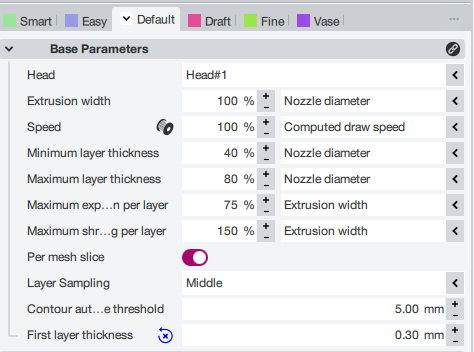
Add the "First Layer Thickness" Binding to the Base Parameters Override and set it to 0.3 mm
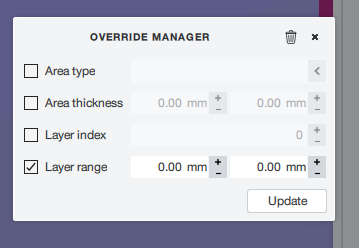
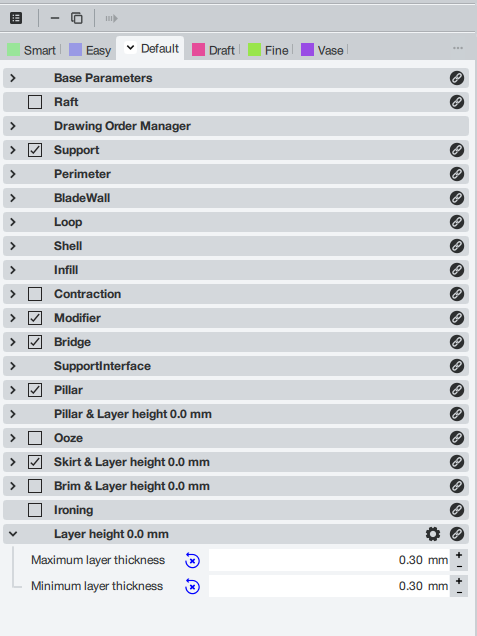
If it is outside, you have to create a new override for the first layer and force the 0.3 Layer thickness by setting the min-max Layer Thickness:
Best Regards,
András
Dear Ian,
The adaptive layer thickness algorithm allows layer thicknesses only in the range of the min and max Layer Thickness values. It has a First Layer Thickness parameter too.
If the desired first layer thickness is in the range of the min-max layer thickness:
Add the "First Layer Thickness" Binding to the Base Parameters Override and set it to 0.3 mm
If it is outside, you have to create a new override for the first layer and force the 0.3 Layer thickness by setting the min-max Layer Thickness:
Best Regards,
András